
In your leadership meeting, someone points at the two people who spend the week retyping forms and chasing approvals, and asks whether AI could do that now. It is the local version of a bigger question, will AI replace human workers, and in document-heavy operations the answer is: not the people, but most of what fills their week. The reading, typing and chasing go to software. Confirming what is true, and answering for it, stays with a person.
The line runs through each job, not between jobs
Most answers to this question sort jobs into two piles: data entry and bookkeeping marked "at risk", anything involving judgment marked "safe". Inside an operations team that picture falls apart, because almost nobody does only one kind of work. The coordinator who retypes a form into a spreadsheet is also the one who notices it is last year's version, that a signature is missing, or that the total doesn't match the invoice.
So the split between replaced and augmented runs through each job. On one side is moving information: reading a document, typing its values into another system, drafting a letter from data that already exists, chasing a signature. On the other is deciding what is true and answering for it. AI is good at the first. Where a mistake costs money, a benefit or an audit finding, it shouldn't be left alone with the second.
Goldman Sachs Research reported in April 2026 that jobs are falling where AI can substitute for workers and rising where it augments them, with AI cutting US monthly payroll growth by roughly 16,000 jobs over the past year. A modest net drag, then, and evidence that the split is real. It can't tell you which side your team is on. That depends on how much of each job is moving information.
What AI took over in the systems we built
We have built document systems for claims, HR, compliance and grant reporting. In each one, the work AI took over was the same kind of work.
PeopleWorks runs HR for dozens of client companies, each with its own letterhead, employee data and rules. Every letter used to take about 20 minutes by hand, and signing meant emails back and forth.
Now the letter system we built for PeopleWorks picks the right letterhead, pulls the employee's data and produces the finished letter in 20 seconds. It runs on n8n, a workflow engine that carries each step to the next. Signing goes through OpenSign: HR review, company approval, the employee's signature, and the follow-ups nobody wanted to send.
On the claims platform we built for veterans, AWS Textract reads uploaded medical records and pulls out each condition and its service connection. The system then drafts the personal statements, Disability Benefits Questionnaires and nexus letters a claim needs. Document handling is 80 percent faster than entering it by hand.
At Stay Funded 360, grant receipts used to be printed, sorted into piles and summarised on typed cover sheets at month end, which took days. Now each receipt is photographed when the money is spent, AI reads the subtotal, tax and fees, and month end is a review and a download.
Reading, typing, drafting, routing, chasing. Across our clients, removing that kind of work added up to more than 2,500 manual hours in 2025, counted conservatively. Very little of it was anyone's real job. It was the work standing between them and their real job.
What stayed with a person, and why
Every one of those systems kept a person at the same point: the moment a value becomes a record, or a document goes out under someone's name.
At VA Claims Made Easy, a VA agent or a doctor reviews and edits every drafted document before a veteran sees it, because a wrong claim costs a veteran their benefit. At Stay Funded 360, nothing read off a receipt is recorded until a person confirms it. On a packet that reconciles to the dollar, an unchecked number is worse than a typed one.
The compliance portal we built for a behavioral health operator reads uploaded licences and certificates, suggests their values, and blocks approval until someone confirms them. Three industries, and we arrived at the same design each time, because typing a value is slow and confirming one already filled in is quick. Keep the person at that step and it costs little. Take them out and the most expensive mistake in the workflow happens where nobody is looking.
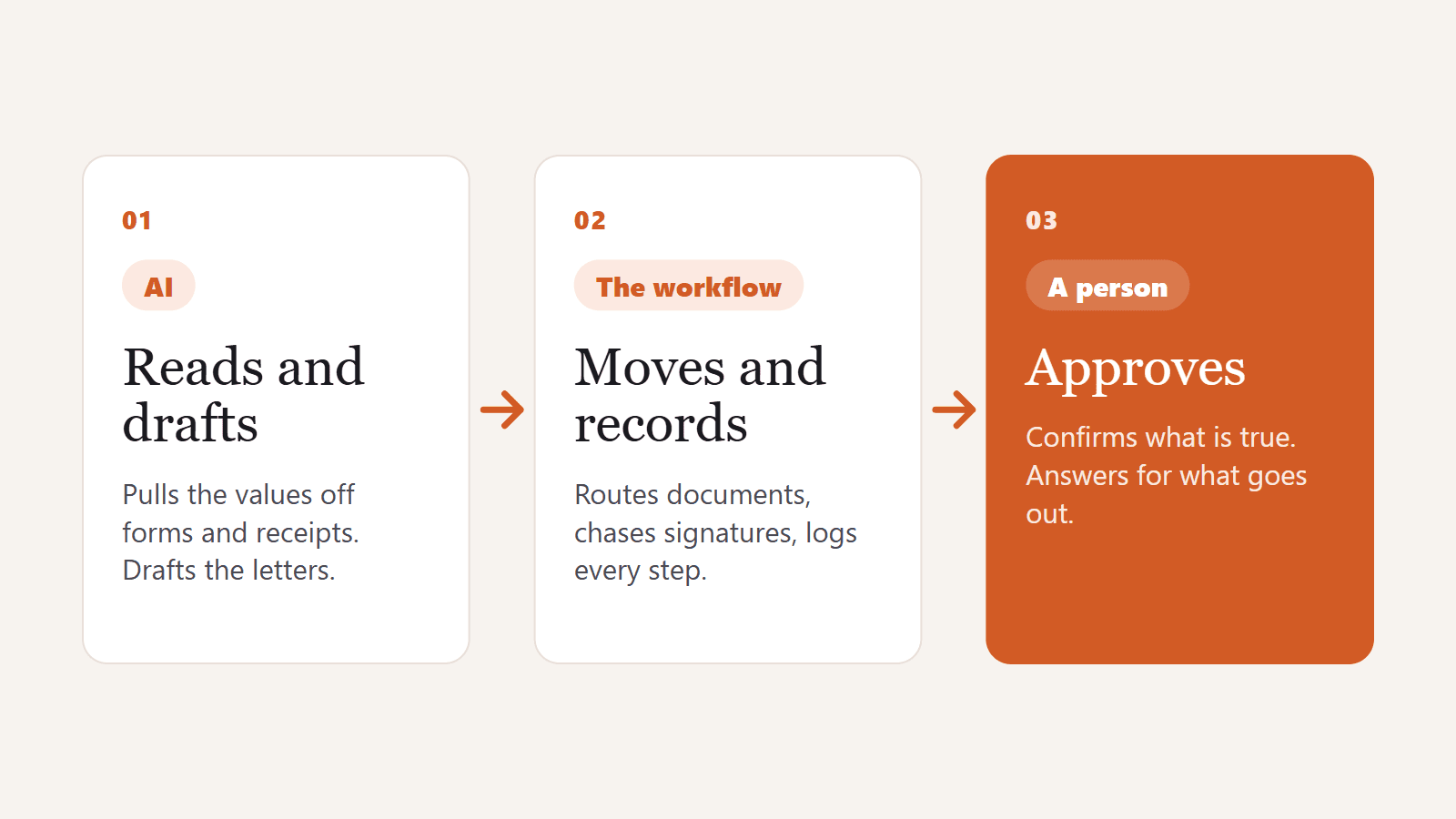
Some steps stay manual because no system should do them yet. A funder's decisions on a grant packet come back as pen marks on a scanned page, so a reviewer enters them by hand. The finished packet is produced by the system and sent by a person at the organisation. AI reads and drafts. The workflow moves and records. The person approves.
Where AI does replace work, and who decides what happens next
None of this means jobs stay the same. A role made entirely of retyping forms will not survive in its current shape, and pretending otherwise helps nobody. The same Goldman Sachs analysis makes a quieter point: augmentation that makes people more productive can also mean fewer people are needed for the same amount of work.
What happens next is a decision the business makes, not one the software makes. In an operation that is growing, the same effect looks different: the team you already have takes on the bigger contract, instead of you hiring someone just to keep up. And the coordinator who spotted last year's form and the missing signature is exactly the person you want confirming what the system read. That knowledge is what makes the review quick and the records right.
How to tell which parts of your team's work AI will take
Pick one workflow your team runs all the time, such as a new-hire packet, a monthly report or a claim file, and write down every step with the person who does it. Then sort each step with three questions:
Does it move information from one place to another, or build a document from data someone already approved? Software can take it.
Does someone confirm a value is true, or put their name to the result? Keep a person there, and have the system make that check quick.
Is the input something no system reads reliably, such as handwriting, a stamp or a pen mark? A person enters it, and software helps them find it.
Do this for the two people from that leadership meeting and most of their week will likely land under the first question. The part of their job that matters lands under the second. The first is what AI will take. The second is why you hired them.
If you'd like to run this on one of your own workflows, the audit on our services page maps it in 48 hours, and you keep the build plan whether or not you work with us.
Frequently asked questions
Will AI replace human workers entirely?
Not in work where someone has to answer for the result. AI can take over most of the reading, typing, drafting and chasing in a job, but confirming what is true and approving what goes out still needs a person. Roles made only of moving information will change the most.
Which jobs are most at risk from AI?
Jobs made mostly of moving information, such as retyping forms, copying data between systems and assembling routine documents. Jobs built on judgment, review and accountability change too, but their core stays with a person.
What does AI augmentation mean in practice?
The system does the slow, repetitive part and the person does the judgment. On the veterans' claims platform we built, AWS Textract reads medical records and the system drafts the letters, and a VA agent or doctor reviews and edits every one before a veteran sees it.
Should we cut staff after automating document work?
That is a business decision, and the software doesn't make it for you. A growing team can use the time to take on more volume without hiring, and the people who know the old process best are well placed to review the new one.
Can AI make the final decision in regulated work?
It shouldn't where a mistake costs money, a benefit or an audit finding. In the claims, compliance and grant reporting systems we built, AI reads and suggests, and nothing is recorded or sent until a person confirms it.