
You stopped the upgrade client and reverted the deploy, and the dashboards are still red. Something is still running. A database schema migration outage can go this way: the revert undoes the code, but the migration the code started keeps working inside the database. Render's postmortem of its October 14, 2026 outage shows exactly that, and it points to a rollback step that is easy to leave out.
The upgrade that passed its practice run
According to Render's postmortem, builds and deploys across all regions failed to start, stalled or were significantly delayed in two periods, about 2 hours and 20 minutes in total. Live user services were not affected.
The cause was a planned version upgrade of an internal job scheduler, the system that coordinates builds, deploys and other platform operations. Render says the upgrade was started in production after a successful practice run in a test environment. It included a schema migration that locked a large table and drove database CPU to 100%. That database held the scheduler's core job state, so the system could no longer read or write it reliably.
The postmortem does not give the size of the table or the exact statement, so this post does not guess at either.
Why the revert did not end the database schema migration outage
The upgrade started at 12:13 PDT. Impact was identified at 12:24, and at 12:34 engineers reverted the upgrade and stopped the client running the migration. By 12:37 the scheduler had recovered and builds and deploys resumed, though slowly.
The recovery was only partial. At 13:17 the team restarted one unhealthy instance to rebalance load, and database connections and errors rose across the system. At 13:49 engineers found the schema migration still running on the database and terminated it. That was about 1.5 hours after it started, and an hour and a quarter after the revert.
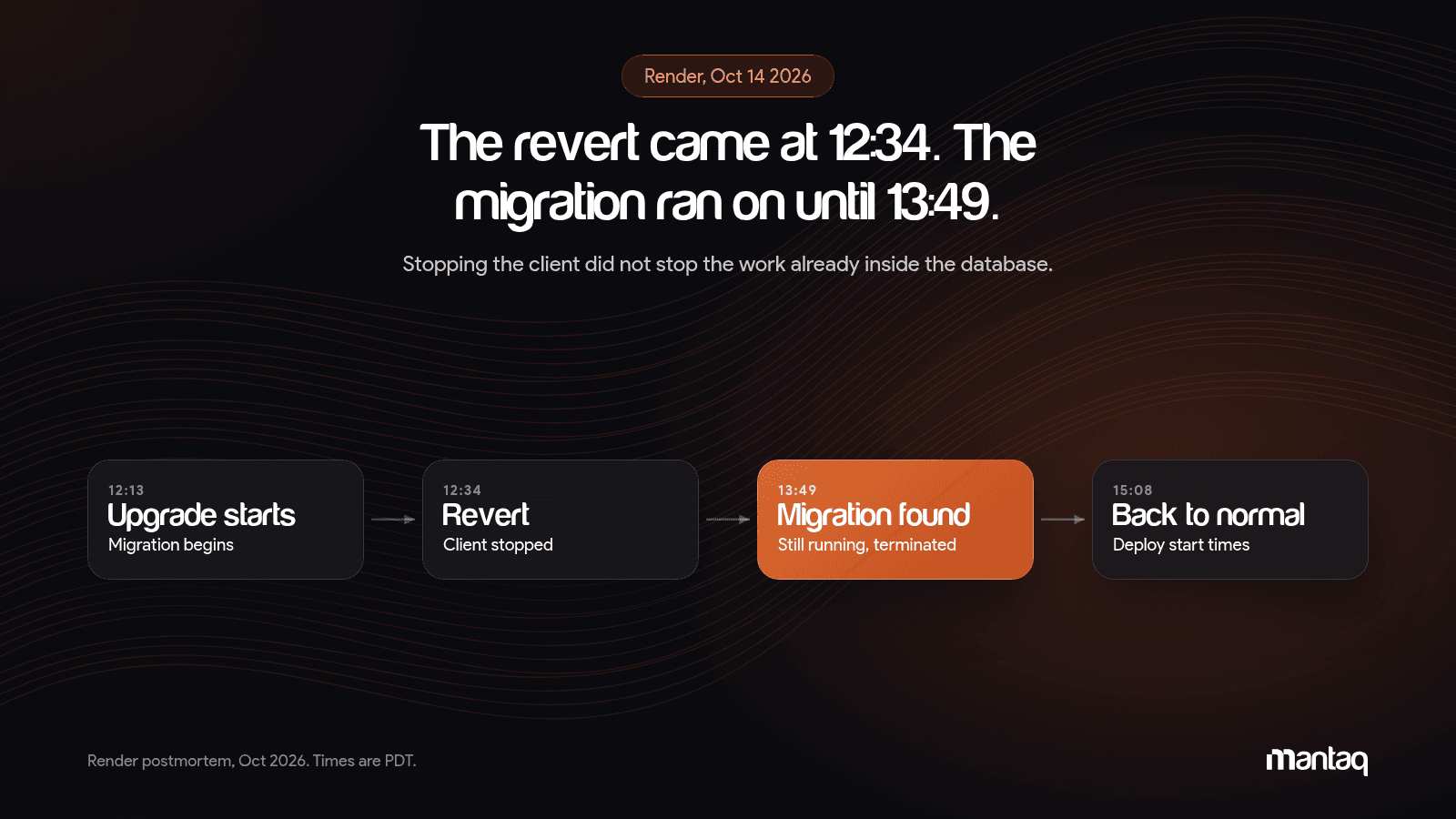
The reason is ordinary. A revert acts on what you deploy: the image, the binary, the config. A migration is different. The client sends a statement, and from then on the work runs inside the database. Stopping the client does not necessarily tell the database to stop. The report does not name Render's database, so treat this as the general mechanism and not a description of their stack.
A rollback plan that depends on the thing that failed
Render lists two more factors that stretched the outage. A step before the upgrade, creating a database clone to roll back to, could not be completed because of an error from the underlying cloud provider, so a fast rollback was not available. Later, an attempt to add capacity to the database failed for the same kind of reason.
Both are the same shape. The plan for getting out depended on something that was not guaranteed to be there when it was needed. A rollback that needs the cloud provider, in the middle of an incident, is a rollback that may not exist.
Render says it has paused the upgrade in production until the process changes, and that it plans to move to blue-green deploys for this system. Those are plans, not finished work.
Before you run the migration
The usual guides teach safe patterns, and they are worth following: add before you remove, keep lock waits short, and test on production-sized data. A practice run is not evidence that the real table will behave, so check how the test data compares with the real one.
Then write down the recovery side before you start. Where is the restore point, and have you confirmed it exists? How do you see every statement running on the database right now? Who is allowed to terminate one, and how long will it take to reach them? A short list answered in advance costs minutes. Answered during an incident, it costs an hour.
What to check on the database, not the deploy
When you revert, add a second step that asks the database directly. List the running statements, find the one the migration started, and check whether it is still holding locks. Stop it deliberately, then confirm that it stopped and that load has fallen.
This is the part Render's timeline makes plain. The upgrade was reverted 21 minutes after it started. The migration was found and terminated 75 minutes after the revert. The report does not say why it took that long, but the gap shows that reverting the code was not enough to stop the work. A rollback undoes code. Work the code already handed to another system needs its own way to stop and its own check that it stopped.
One limit applies. This is one public postmortem, and its causes may not match your database. Safe migration patterns reduce the risk, but they do not remove it. If you want help writing down the recovery side of a risky change, our services page shows how we map it, and we can talk it through in a 30-min call.
Frequently asked questions
Why does a schema migration lock a table?
Some changes need exclusive access to the table while they run, so other reads and writes wait. On a large table that wait can be long, and the load can overwhelm the database.
Does reverting a deploy stop a running migration?
Not necessarily. In Render's outage, the migration kept running on the database after the client was stopped and the upgrade reverted, until engineers found and terminated it.
How do you find a migration still running on the database?
Ask the database for its list of running statements and look for the long running one the migration started. Check whether it holds locks, and confirm it is gone after you stop it.
How do you test a migration before production?
Run it on data of a similar size and shape to production, and measure lock time and load. Render's upgrade passed a practice run in a test environment and still caused trouble in production.
What should a rollback plan include?
A restore point you have confirmed exists, a way to see and stop running statements, and a check that the work really stopped. Do not rely on a step that needs the cloud provider during the incident.