

It is late afternoon and you have asked a coding tool to build the part of a workflow that takes an uploaded invoice, pulls out the totals and drops a draft into a review queue. Twenty minutes later it runs on the three samples you tried. AI coding tools for document workflows can build most of that system well, but the checks belong to a person: the values it records, the rules it applies and the approvals it routes.
Where developers use coding tools today
In Stack Overflow's 2026 Developer Survey, more than 30,000 people answered questions about their work and tools. Among those who use AI coding assistants or agents, 73% use them daily, and Claude Code and GitHub Copilot lead the agents they pick. The main uses are generating code in familiar areas, at 67%, and debugging, at 61%. Deploying, operating or troubleshooting production systems came in at 20%.
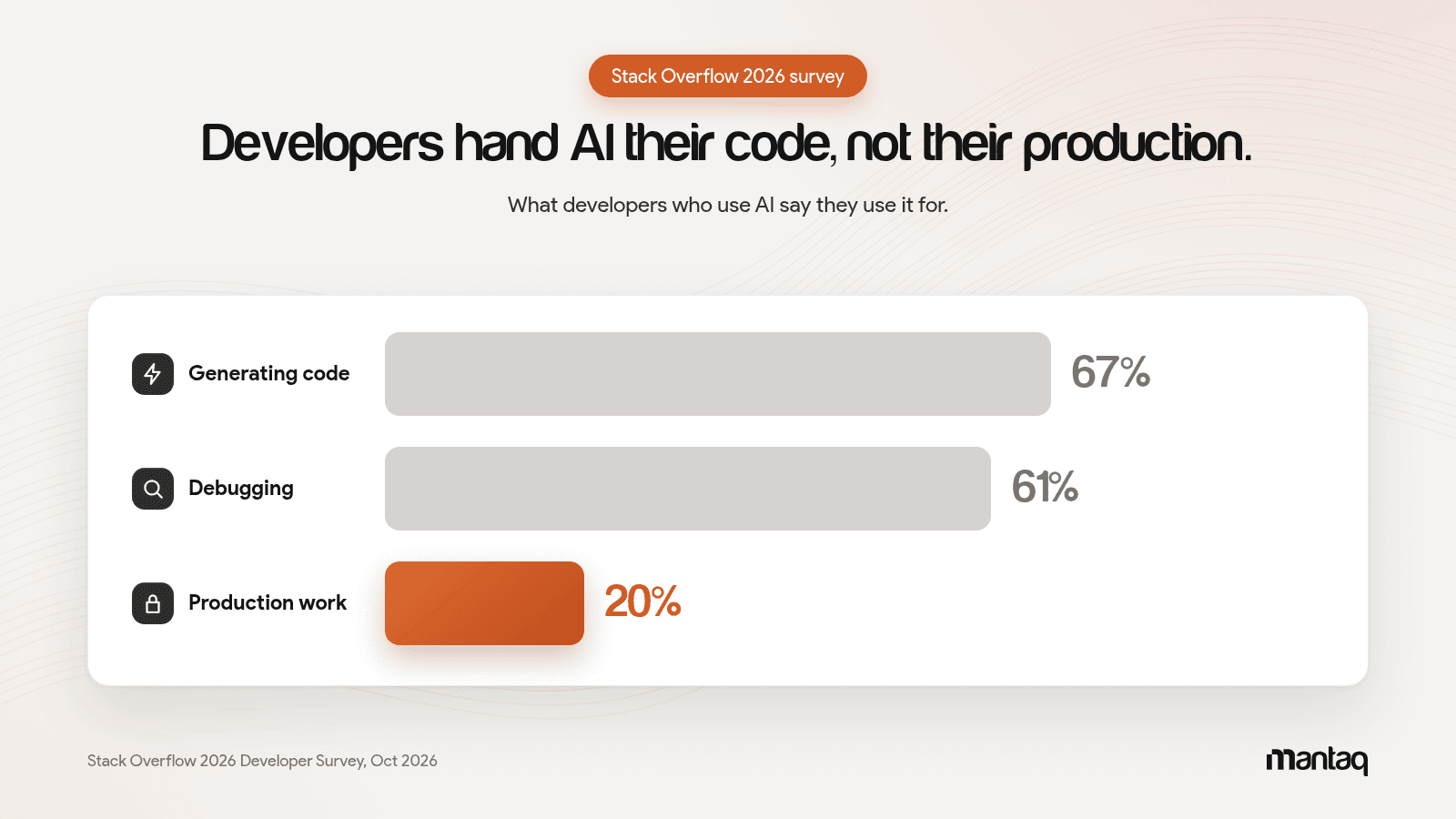
That is a survey of habits, not a ruling on what is safe. It still shows a line most developers drew on their own: the tool gets the code they know well, and it stays away from the place where mistakes land on real people.
What a coding tool builds well in a workflow
A document workflow has a lot of plumbing. An intake form and an upload step. A queue that routes each document to the right role. Reminders that chase a missing page. A merged PDF built from data someone already approved. This is familiar code with a clear shape, and you can run it and watch what it does.
It is also cheap to undo. If the routing is wrong, someone notices a document in the wrong queue, and you fix the rule. The mistake is visible, and it costs an afternoon. That is the test worth using before you hand a step to a tool: how loudly does it fail, and how much does it cost to take back?
Where one wrong value costs too much
The expensive part of a document workflow is the value the code carries. A total read off a receipt. A condition pulled from a medical record. A date that decides whether a credential has lapsed. A sample that passes tells you the code handled that sample. It says nothing about the document nobody looked at.
We saw why this matters on the claims system we built for veterans: reading documents saves hours, but a wrong claim costs a veteran their benefit. In Stay Funded 360, the grant packet has to reconcile to the dollar, so an unchecked number is worse than a typed one. The code that reads the value is the easy part. Deciding who confirms it is the design.
Block, don't warn
When you ask a tool to write validation, it will often write a warning: a message, a log line, a yellow banner. A check that only warns is a suggestion. People click past suggestions on the last day of the month.
Stay Funded 360 does something plainer. Every expense is checked for its receipt and proof of payment, line items can never add up to more than the grant, and the download is blocked while anything is missing. The system names the record that is missing. The compliance portal we built for a behavioral health operator works from the same rule, and it routes every permission check through one function that denies by default.
When a tool hands you code for a step like these, read it for three things:
Where does a value become a record, and does anyone confirm it first?
When a required piece is missing, does the step stop or only complain?
Who can reach this, and does the default answer no?
What a person still confirms
In both systems, AI reads and a person confirms. A receipt is read, and nothing is recorded until someone has looked at it. An uploaded licence is read, its values are suggested, and approval stays blocked until a person confirms them. Confirming a value that is already filled in is quick. Typing it was the slow part.
Testing follows the same logic. Test the code that reads documents against documents where you already know the right answer, and include the ugly ones: a missing page, a total that does not add up, a scan with a stamp across the figure. Some inputs no system reads reliably. In Stay Funded 360, what the funder disallowed arrives as pen marks on a scan, so a person still enters it by hand.
The tool can write the code that moves the document. A person has to own the value it carries.
Where the line may move
This is a rule of thumb, not a law. A small team with good tests, a staging copy of its data and a fast rollback can safely hand a coding tool more than this post suggests, including steps closer to production. The survey says most developers keep it out of production today. It does not say they are right to, or that they always will be.
What holds either way is the question you started with. Back at that invoice that worked on three samples: let the tool keep the intake, the routing and the reminders. Put your own eyes on where the value is recorded and what happens when something is missing.
If you are building a system around documents and want a second opinion on where those checks go, we can walk through it with you in a 30-min call. Our services page shows how an audit, a build and ongoing support fit together.
Frequently asked questions
Can AI coding tools build a document workflow?
Yes, most of the plumbing: intake, routing, reminders and document assembly. The steps that record a value or approve a document need a person to read the code and confirm the result.
Which parts of a workflow should a person check?
Where a value becomes a record, what happens when a required piece is missing, and who is allowed to reach each step. A wrong answer in any of the three costs more than the time it saves.
How do you test code that reads documents?
Run it on documents where you already know the right answer, including bad ones with a missing page or a total that does not add up. Passing a few clean samples proves very little.
Is Claude Code or GitHub Copilot better for workflow automation?
The survey shows both are widely used, but it does not say which is better at this. The tool matters less than the checks around what it writes.
Should a coding tool have production access?
Most developers in the survey keep it out of production. Give it reversible steps first, and keep production authority with a person unless you have tests and a fast rollback.